1.1 Introduction to the Web
Updated Jun 21, 2026
Introduction
In this course, we will learn how modern websites and web applications are built.
Before learning HTML, CSS, and JavaScript, it is important to understand how the Internet works and how information travels between computers around the world.
By the end of this lecture, you should understand:
- What the Internet is
- How computers communicate
- What IP addresses are
- The role of DNS
- How HTTP and HTTPS work
- How browsers access websites
The Internet
The Internet is a global network that connects computers and devices around the world.
Every day we use the Internet to:
- Visit websites
- Watch videos
- Send messages
- Download files
- Use web applications
The Internet allows computers to communicate with one another regardless of their physical location.
Routers
Data does not travel directly from one computer to another. Instead, it passes through multiple devices called routers.
A router’s job is to:
- Receive data
- Determine the best route
- Forward data to the next destination
Example:
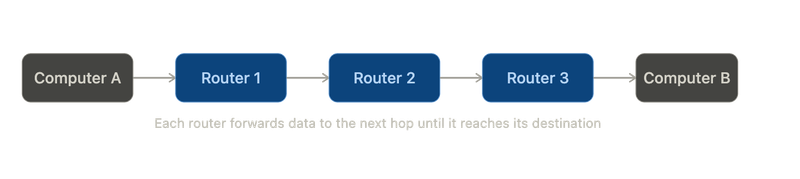
If one route becomes busy, routers can choose another path. This makes the Internet reliable and efficient.
Packets
Information sent over the Internet is divided into smaller units called packets.
Instead of sending an entire file at once, the file is broken into packets and sent individually.
Each packet contains:
- Source Address
- Destination Address
- Data
- Control Information
The destination computer combines all packets back into the original file.
TCP/IP
Communication on the Internet relies on two important protocols: IP and TCP.
IP (Internet Protocol)
IP is responsible for identifying devices on the Internet.
Every device connected to the Internet has an IP address.
Examples:
192.168.1.1

8.8.8.8
IPv4 addresses contain four numbers separated by dots. Each number ranges from 0 to 255.
IPv4 uses 32 bits and supports approximately 4.3 billion unique addresses. Modern networks increasingly use IPv6, which uses 128 bits and supports a vastly larger number of addresses.
TCP (Transmission Control Protocol)
TCP is responsible for:
- Dividing data into packets
- Tracking packet order
- Detecting missing packets
- Requesting lost packets again
- Reassembling packets correctly
TCP ensures reliable communication between computers.
Ports
TCP also uses port numbers to identify services running on a computer.
Common ports include:
- Port 80 — HTTP
- Port 443 — HTTPS
When data is transmitted, the following information is included:
- Source IP
- Destination IP
- Port Number
This allows computers to know exactly where information should be delivered.
DNS
Remembering IP addresses is difficult.
Instead of typing:
142.250.193.78
we type:
google.com
DNS (Domain Name System) converts domain names into IP addresses.
Example:
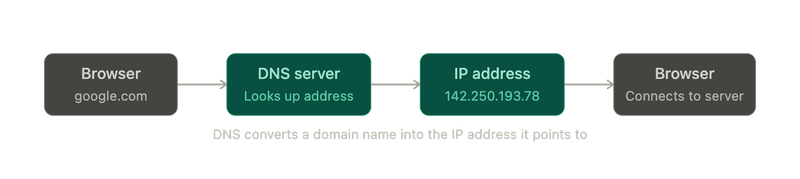
DNS acts like the phonebook of the Internet.
DHCP
DHCP stands for Dynamic Host Configuration Protocol.
DHCP automatically assigns:
- IP Address
- Default Gateway
- DNS Servers
to devices when they join a network.
Without DHCP, these values would need to be configured manually.
HTTP and HTTPS
HTTP stands for HyperText Transfer Protocol.
HTTP is the protocol used by browsers and servers to communicate.
HTTPS stands for HyperText Transfer Protocol Secure.
HTTPS is the secure version of HTTP and encrypts communication between the browser and server.
URLs
A URL identifies the location of a resource on the web.
Example:
https://www.example.com/folder/file.html
Components of a URL:
- Protocol → https://
- Domain Name → www.example.com
- Path → /folder/
- Resource → file.html
The .com portion is called a Top-Level Domain (TLD).
Examples include:
- .com
- .org
- .edu
- .gov
- .net
Requests and Responses
Web communication follows a request-response model.
Request
The browser requests information from a server.
Example:
GET / HTTP/2

Host: www.kharaayo.com
Meaning: Please send me the homepage.
Response
The server sends information back.
Example:
HTTP/2 200 OK

Content-Type: text/html
The browser then renders the webpage.
HTTP Status Codes
Servers return status codes to indicate the result of a request.
Common status codes include:
| Status Code | Meaning |
|---|---|
| 200 | OK |
| 301 | Moved Permanently |
| 302 | Found |
| 304 | Not Modified |
| 307 | Temporary Redirect |
| 401 | Unauthorized |
| 403 | Forbidden |
| 404 | Not Found |
| 418 | I'm a Teapot |
| 500 | Internal Server Error |
| 503 | Service Unavailable |
404 Not Found
The requested page does not exist.
Example:
example.com/page-that-does-not-exist
500 Internal Server Error
A server-side error occurred.
In web development, this often indicates a problem in the application code or server configuration.